CRM Adoption Challenges Every Sales Team Needs to Overcome
Sales reps, SMBs, and startups all hit the same CRM adoption walls. Discover the real causes of low adoption, the hidden costs, and proven fixes that work.
Low CRM adoption is the primary reason CRM investments fail to deliver their promised return. Across organizations of every size, the pattern is consistent: software is purchased, a brief rollout occurs, and then usage quietly declines as users revert to spreadsheets, email threads, and manual notes. Failure to harness the full capabilities of a CRM system produces downstream damage that includes inaccurate pipeline data, reduced lead qualification, and negative ROI.
A CRM (Customer Relationship Management) system is primarily a sales tool, but when used correctly it supports marketing, customer service, business development, finance, and management across an entire organization. Despite that breadth of value, adoption rates remain stubbornly low. Research by CSO Insights found that fewer than half of businesses surveyed achieved a 90 percent CRM adoption rate. Understanding exactly where and why adoption breaks down is the first step toward fixing it.
Does Data Entry Kill CRM Adoption?
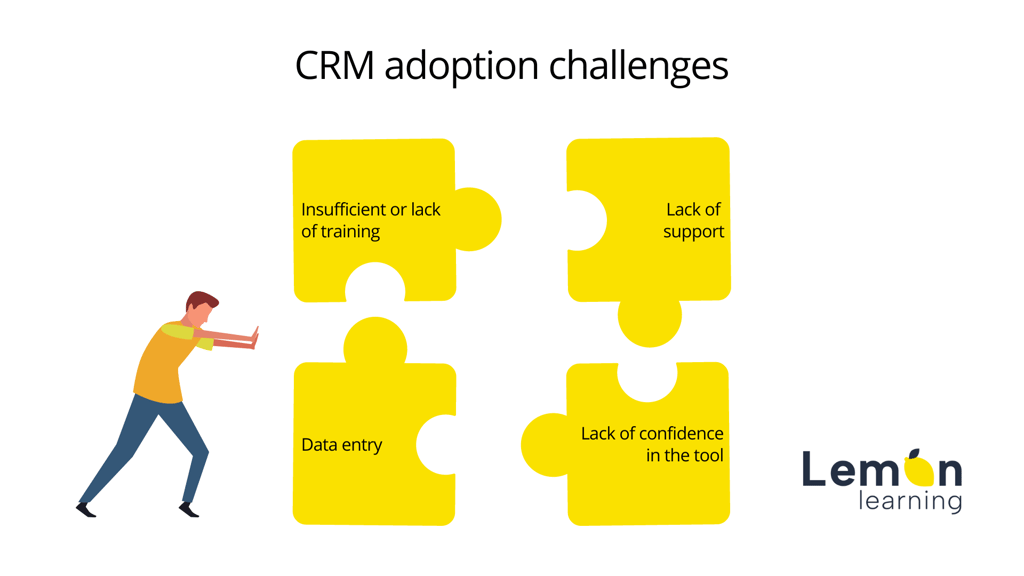
Yes. Repetitive, time-consuming data entry is one of the most consistently cited reasons sales representatives disengage from a CRM. When logging a call, updating a contact record, or entering a deal stage requires navigating multiple screens without clear guidance, users find workarounds or stop logging altogether.
Sales teams add to the prospect and client data pool every day: contact details, meeting notes, deal stages, follow-up actions, and more. When training on data standards is absent or generic, the result is predictable:
Duplicate contacts that distort pipeline reporting
Manual entry errors that undermine forecasting accuracy
Poor activity logging that hides real sales velocity
Low customer data quality across the organization
Accumulated time losses that compound weekly
Incomplete, duplicated, and stale records are not a data hygiene problem in isolation. They are a direct symptom of insufficient adoption support. When users lack confidence in how to enter data correctly, they either enter it incorrectly or avoid entering it at all. Either outcome degrades the value of the entire system for every team that relies on it.
What Happens When CRM Support Stops After Go-Live?
Adoption collapses. The most common pattern in failed CRM rollouts is that support ends shortly after implementation. Users complete an initial training session, are handed login credentials, and are then left to navigate a complex system alone. Major CRM platforms release updates and new features regularly. Without structured communication and in-context guidance for each update, those changes create friction rather than value.
The consequences of a support vacuum include:
Misuse of CRM features that corrupts shared data
Wrong data outputs feeding inaccurate reports to leadership
Time lost on support calls and peer troubleshooting
Growing user frustration that turns into active avoidance
Steadily declining CRM adoption across the team
Think of CRM adoption like a windmill: it needs a continuous flow of energy to keep turning. A single training session at launch is not sufficient. Support must be ongoing, contextual, and tied to the real tasks users perform day to day.
"You can run the most interesting project in the world, but if there is no support for users, adoption will be very limited. So you need tools that let people build skills on these new tools easily and intuitively."
Pierre-Alexandre Mass, DSI de transition, on the Lemon Learning podcast
Why Do Sales Reps Mistrust Their CRM?
Mistrust is a significant and often underestimated CRM adoption challenge. Sales representatives frequently view a CRM as a surveillance instrument rather than a productivity tool, particularly when it is introduced alongside aggressive performance targets or micromanagement practices.
If you are implementing a CRM system for the first time, plan for resistance to change from the outset. The root cause is usually not the software itself but how it is positioned and deployed. The key question users ask is not "what can this tool do for the company?" but "what does this tool do for me?" Failing to answer that question clearly and early sets any CRM project up for low adoption before users have even logged in for the first time.
Effective change communication reframes the CRM as a personal productivity tool: one that reduces administrative burden, surfaces better leads, and gives the sales rep a clearer picture of their own pipeline. When that story is told convincingly by credible internal advocates, resistance diminishes substantially.
How Does Insufficient Training Undermine CRM Success?
Insufficient training is the most direct and controllable cause of low CRM adoption. The typical failure mode looks like this: one person in the organization is designated as the CRM owner, receives training from the vendor, and is expected to cascade that knowledge to everyone else. Without structured, role-specific learning paths, the cascade breaks down immediately.
The downstream effects of inadequate CRM training are well documented:
Users lack confidence navigating core features
Trial-and-error usage leads to data errors that persist
Time is wasted on basic tasks that should take seconds
Repetitive misuse of features becomes normalized
The designated CRM owner is overwhelmed with support requests
Users revert to familiar tools such as spreadsheets
Consider a new sales representative asked to build a pipeline, generate a forecast report, or export a call list. If the training they received was generic and classroom-based, the probability of errors is high. One bad experience with a CRM task is often enough to cause a user to avoid that feature permanently. When that avoidance spreads across a team, it becomes structural low adoption. The challenges of CRM training are not just about content; they are about timing, format, and relevance to the user's actual role.
What Are the Common Integration Challenges When Adopting a CRM?
Technical integration is a frequently underestimated barrier to CRM adoption, particularly for organizations with legacy systems or heterogeneous software environments. When a CRM cannot cleanly connect with existing tools, such as email platforms, ERP (Enterprise Resource Planning) systems, marketing automation tools, or financial software, users are forced into manual workarounds that undermine the system's value proposition.
Common integration challenges include:
Data silos that prevent a unified customer view
Inconsistent data formats between the CRM and connected systems
Synchronization failures that create duplicate or conflicting records
Authentication and security constraints that slow API (Application Programming Interface) connections
Version incompatibilities between legacy platforms and modern CRM architecture
For organizations evaluating how CRM compares to other enterprise platforms, understanding the differences between CRM and ERP systems is an important step before selecting an integration strategy. Integration problems that are not resolved before go-live become user-experience problems immediately after it, directly damaging adoption rates.
What Slows Down Adoption of Mobile CRM Apps?
Mobile CRM adoption faces a distinct set of obstacles on top of the general challenges above. Field sales teams, account managers, and remote workers are the users most likely to benefit from mobile CRM access, yet they are also among the least likely to adopt it consistently without specific support.
The primary factors that slow mobile CRM adoption include:
Mobile interfaces that differ significantly from the desktop experience, requiring separate training
Connectivity constraints that disrupt data synchronization in the field
Reduced feature parity between mobile and desktop versions, causing confusion about where to log information
Security policies that create friction at login (multi-factor authentication on mobile)
Lack of mobile-specific training content or in-app guidance optimized for smaller screens
Mobile CRM adoption requires its own change management track, with training content designed for the mobile interface, clear guidance on which tasks are best completed on mobile versus desktop, and ongoing support that accounts for the different context in which mobile users work.
Why Do SMBs and Startups Abandon CRM Systems?
Small and medium-sized businesses (SMBs) and startups face a distinct combination of CRM adoption barriers that larger organizations do not encounter to the same degree. The core tension is resource scarcity: limited budget, small or absent IT teams, and no dedicated change management function.
The most common reasons SMBs abandon their CRM are:
Complexity vs. team size: Enterprise-grade CRM features are overwhelming for small teams that only need a fraction of the functionality.
Cost: Licensing costs, implementation fees, and ongoing customization expenses frequently exceed what SMBs budgeted, leading to a decision to abandon the tool rather than invest further.
No internal CRM champion: Without a dedicated person driving adoption, usage fades quickly after initial setup.
Lack of technical expertise: Startups often lack in-house skills to configure, integrate, or troubleshoot the CRM.
Poor tool-process fit: A CRM selected without involving end-users rarely maps to actual sales workflows, making it feel like additional overhead rather than a useful system.
For startups specifically, the failure often occurs not at selection but at the post-implementation stage. Initial enthusiasm gives way to frustration when the gap between the tool's potential and the team's ability to use it becomes apparent. Maintaining CRM adoption past the first few months after rollout requires a structured plan, not an assumption that users will self-educate.
Common Sales CRM Adoption Challenges at a Glance
Sales team challenge
Organizational response
Repetitive data entry consuming selling time
Automate routine logging; use CRM checklists and workflow automation
Time-consuming manual tasks
Standardize processes and map them to CRM features before rollout
Lack of support after go-live
Provide both internal CRM champions and vendor support resources
Lost productivity during the learning curve
Deliver training inside the CRM application, not only in classrooms
Mistrust of the CRM as a performance monitor
Communicate personal user value through structured change management
Inability to see the CRM's value to their role
Secure management and leadership advocacy from the start
Integration failures with existing tools
Audit integrations before go-live; test all connected systems with real users
Mobile adoption friction
Create mobile-specific training content and in-app guides
How to Improve CRM Adoption
Improving CRM adoption requires action before, during, and after rollout. Implementation is only the beginning. The organizations that achieve high, sustained CRM adoption treat it as an ongoing program rather than a one-time project.
Change Management: The Foundation of CRM Adoption
Without structured change management practices, a CRM quickly becomes "just another tool" that occupies a browser tab but drives no real behavior change. Assigning change management leaders to advocate for and drive adoption throughout the project is not optional; it is the single most important organizational lever available.
Effective change management for CRM adoption includes:
Communicating the purpose and benefits at every stage: before, during, and after go-live
Identifying user pain points and workflow friction points early
Determining the resources and support structures each user group needs
Personalizing training by role, department, and experience level
Measuring the impact of adoption on business outcomes, not just login rates
Providing continued support that evolves as the platform updates
The goal is to sell the CRM to end-users by demonstrating its value in their specific context, not just the value it provides to leadership. When users see clear personal benefits, resistance drops and sustained adoption becomes achievable.
Personalized Training Inside the CRM
One-size-fits-all training is the approach most likely to fail. No two departments use a CRM in the same way. A marketing team managing campaign attribution has entirely different training needs from a field sales team logging calls or a customer success manager tracking renewal dates.
A DAP (Digital Adoption Platform) embedded directly in the CRM interface makes role-specific, on-demand training possible at scale. With a DAP like Lemon Learning, organizations can:
Create engaging, bite-sized, interactive guides that appear inside the CRM as users work
Personalize and update training workflows automatically as new CRM features are released
Alert specific user groups with targeted in-app messages when relevant changes occur
Provide on-demand support exactly where and when a user needs it, without a support call
This approach directly addresses the challenges of CRM training by moving learning out of the classroom and into the moment of need, which is where it is most effective and most retained.
Consistent, Ongoing Support
Consistent support is the bridge between a successful go-live and sustained long-term CRM adoption. CRM platforms update frequently, adding features and changing interfaces in ways that can confuse even experienced users. Ongoing support should be treated as a product in its own right, not an afterthought.
Practical ways to maintain consistent support include:
Dedicated feedback sessions tied to the CRM release calendar
In-app messaging that proactively communicates new features to the right user groups
Customizable workflows within a DAP that adapt to each software update without requiring a full retraining event
Push notifications sent at the moment a user is performing a relevant task
Data validation tools that catch entry errors in real time before they corrupt shared records
When users feel supported throughout the lifecycle of the tool, rather than only at launch, their confidence and engagement with the CRM grows steadily. That trajectory is the definition of successful adoption.
For organizations looking to structure a full rollout plan alongside their adoption program, the CRM implementation guide covering steps and best practices provides a detailed framework from vendor selection through post-launch optimization.
Lemon Learning's sales operations enablement solution is designed specifically to address CRM adoption challenges at scale, providing in-application guidance, role-based training, and real-time support for sales teams using any major CRM platform.
FAQ
Frequently asked questions
What are some challenges of a CRM system?+
The most common CRM system challenges include poor data quality from manual entry errors and duplicates, resistance to change from users who see the tool as a monitoring device, insufficient training that leaves users reliant on trial and error, lack of ongoing support after go-live, and integration difficulties with legacy systems. Each of these issues compounds the others: poor training leads to data errors, which erodes trust, which reduces usage further.
What are the common barriers to CRM adoption in sales organizations and how can they be mitigated?+
Key barriers in sales organizations are time lost to repetitive data entry, mistrust of the CRM as a performance-surveillance tool, one-size-fits-all onboarding that does not match role-specific workflows, and absence of leadership advocacy. These can be mitigated by communicating the personal value of the tool to each user (not just the business case), assigning change management champions, providing role-based in-app training, and keeping a continuous feedback loop open after rollout.
How to improve CRM adoption?+
Improving CRM adoption requires action at three levels: before rollout (choose a tool that fits existing workflows, involve end-users early, build a change management plan), during rollout (deliver role-specific training inside the application, not just classroom sessions), and after rollout (maintain continuous support, monitor usage data, communicate updates, and celebrate wins). A Digital Adoption Platform (DAP) embedded in the CRM can provide on-demand guidance and reduce the support burden on IT and CRM administrators.
What are the challenges of software adoption?+
Software adoption challenges generally fall into four categories: technical (integration with existing systems, performance issues), organizational (resistance to change, poor executive sponsorship), training-related (insufficient onboarding, no ongoing learning path), and strategic (selecting the wrong tool for the organization's actual needs). For CRM specifically, the sales context adds pressure because time spent on the tool competes directly with time spent selling.
SaaS sprawl is an adoption problem, not just a spend issue. Learn how a digital adoption layer across Salesforce, Workday, and Microsoft 365 reduces...